






Overdue payments in x-Account billing
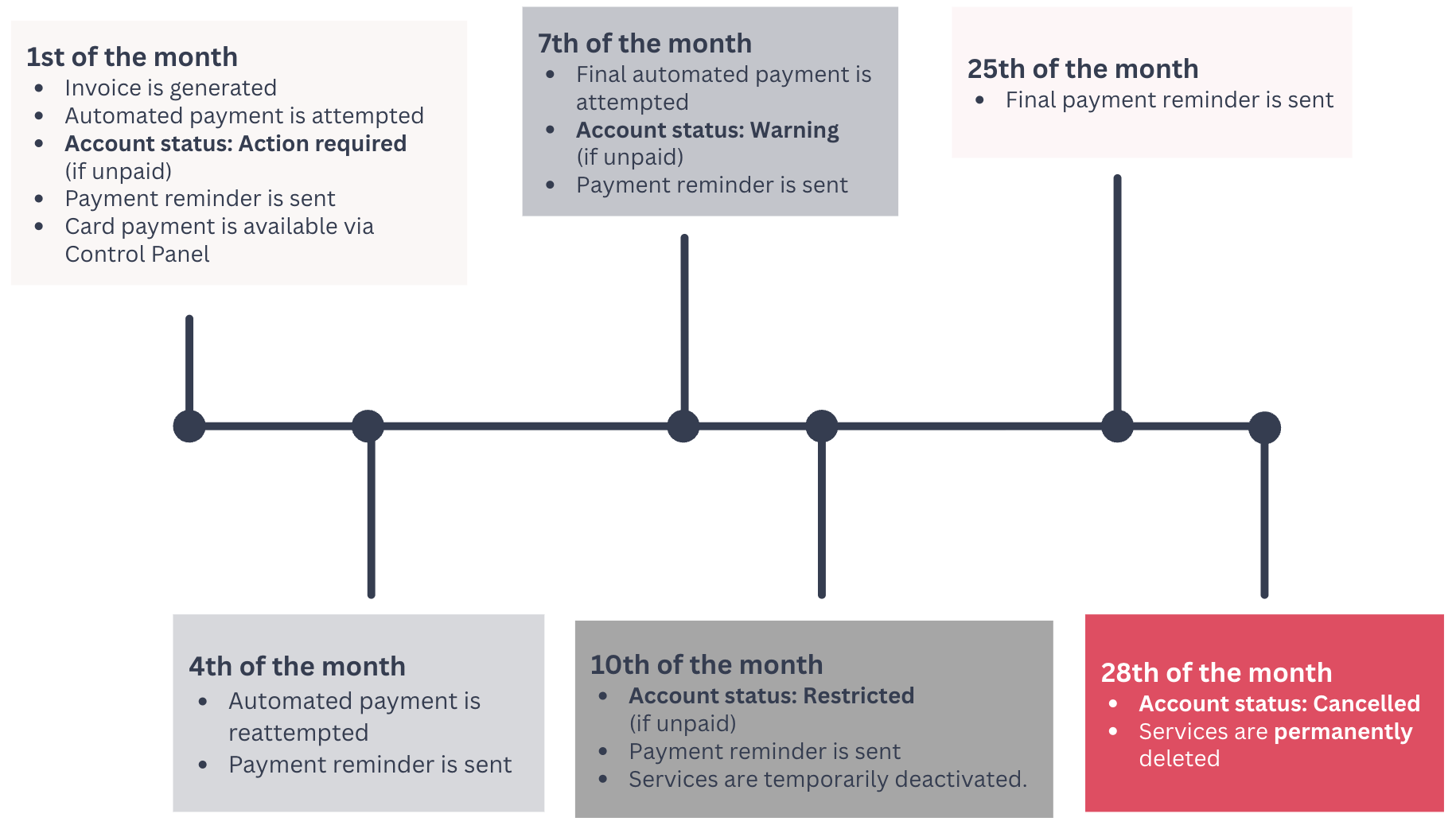
A scheduled automated payment attempt takes place on the 1st of each month. If unsuccessful we will retry on the 4th and 7th. If these attempts remain unsuccessful, your invoice and account status will be updated and appropriate action will be taken.
You’ll receive an email notification after each failed payment. You can also settle your invoice manually via card payment.
What happens if your invoice isn’t paid?
If your invoice is not settled by day 10, your account will be restricted.
- Your xneelo Cloud services, including active instances, will be temporarily deactivated.
- You will not be able to access your xneelo Cloud project, or create a new project.
If your invoice is not settled by 08:00 SAST on day 28, your services will be cancelled.
- Your xneelo Cloud project is cancelled. You can contact us to reactivate it within 14 days. After that, on day 42, your project and all its resources are permanently deleted.
What happens if you settle your invoice?
If you settle your invoice before cancellation, we’ll immediately restore your account and re-enable your services.
If you settle your invoice after cancellation, we’ll restore your account, but will not reinstate your cancelled services. To continue using our services, you’ll need to reorder your products and restore your data from your own backup.
For xneelo Cloud, you may be able to reactivate your project instead. See below:
Reactivate a cancelled Cloud project
You can request reactivation of your Cloud project within 14 days of cancellation. Reactivation is subject to approval and is not guaranteed.
To request reactivation, first settle your outstanding invoice, then contact us via Live Chat or email support@xneelo.com.
You won’t be billed for your project while it’s cancelled.
Billing resumes once your project is reactivated.
The timeline below provides more detail on this process:

You may check your Billing Overview in your Control Panel at any time to view your overall billing status. It provides a real-time snapshot of your spending for the month to date, allowing you to track and manage it effectively.

If you have any questions about your account, please contact us via Live Chat or email us at support@xneelo.com.



