




Private Networking in xneelo Cloud (beta)

This feature is currently in beta. Try this early release and share your feedback via Live Chat.       Learn more

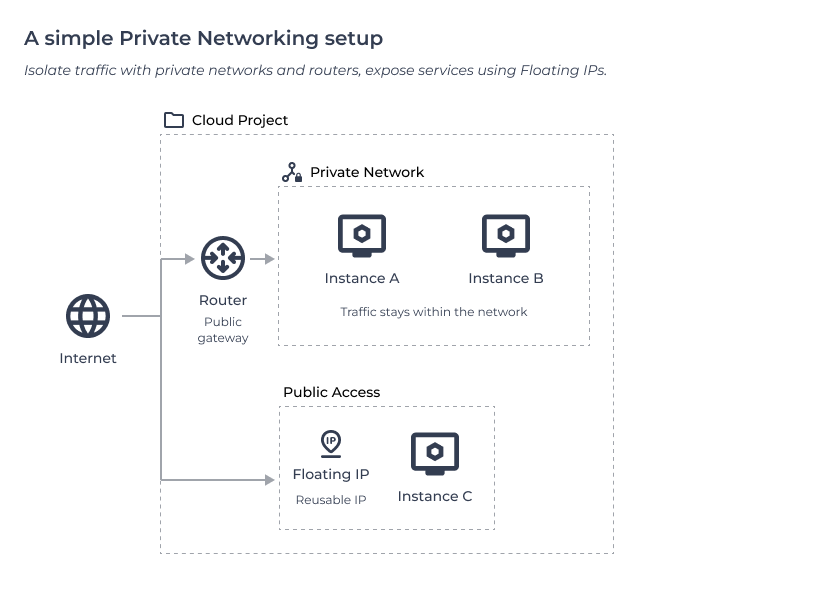
‘Private Networking’ is a set of advanced features in xneelo Cloud that let you design custom networking setups. You can create isolated, internal networks and control how traffic flows between your instances and the internet.

With Private Networking, you can build anything from simple private connections between two servers to complex, multi-tier environments with multiple networks, routers, and security rules.

Read on to learn more about the Private Networking features, the beta programme, and the terms that apply.


  • Private networking features

    The Private Networking features work together like the building blocks of a virtual data centre, giving you the freedom to design a network layout that fits your project.

    Networks and subnets – Create isolated internal networks, define private IP ranges & gateways.

    Instance interfaces – Attach multiple virtual network cards (vNICs) to an instance to connect it to multiple networks.

    Floating IPs – Assign public IPs to instances and move them between resources for failover or flexibility.

    Routers – Link private networks to each other or to the internet.

    Security groups – Act as virtual firewalls for your ports and interfaces, controlling inbound and outbound traffic.

    Note: Project limits apply on network resources. Find out how to request a project limit increase.


  • When to use Private Networking

    Private Networking is ideal for use cases that require custom network topologies, traffic isolation, or enhanced internal security.

    The features are aimed at more advanced users, who are familiar with concepts like IP addressing, subnets, and routing. 

    Here are a few example use cases:

    • Build multi-tier applications (web, app, database) with isolated layers.
    • Create secure internal communication between servers.
    • Segment environments such as development, staging, and production.
    • Run test or staging environments without internet access.
    • Integrate with VPNs or on-premises systems using custom IP ranges.


  • What is the Private Networking beta?

    The Private Networking beta allows you to use these new features in xneelo Cloud at no charge for a period of time.

    As this is an early beta release, the experience is still evolving. You may notice small changes in the dashboard as we receive feedback and make improvements.

    Your feedback will help us improve the final release. If you spot any issues, or have suggestions, please let us know via Live Chat.


  • Duration of the beta

    The Private Networking beta will run until early 2026, after which it will transition to a full release.

    When the beta ends, billing will begin for:

    • Floating IPs
    • Routers

    All other Private Networking features will remain available at no charge.

    You’ll receive at least 1 month’s notice before the beta ends. Any pricing or feature changes will be communicated to all active Cloud customers before they take effect.

    Learn more about our Cloud pricing and the pricing rules in xneelo Cloud.


  • How to get started

    If you’re new to xneelo Cloud, learn how to sign up and create your first project.

    When you log in to your Cloud dashboard, you’ll see new Networking options in the side menu, clearly labelled as ‘beta’. 

    From there, you can explore the new networking features. If you need help, take a look at the guides in the Network Help Centre.


  • Terms of Service

    As this is a beta feature, the specific terms and conditions of xneelo’s Beta Services will apply. Any system issues will be resolved as quickly as possible within business hours.

    Customers are expected to comply with xneelo’s Acceptable Use Policy. Misuse of Floating IPs or network resources may result in suspension.

    By joining the Private Networking beta, you agree to receive updates about the feature. All feedback will be used only for the purpose of product improvement, as per our Privacy Policy.


  • Frequently asked questions

    Will my networking resources still exist after the beta ends?

    Yes. Any private networks, routers, or interfaces you create during the beta will remain in your project. When billing starts, these resources will simply begin incurring charges according to the new pricing.

    Can I increase my networking limits during beta?

    You can request a project limit increase, but this is subject to approval. See the project limit increase process.

    How will I know when pricing changes take effect?

    We’ll notify all active customers at least 1 month before the transition from beta to paid release. This update will be communicated via email, and notifications in the Cloud dashboard.