






xneelo logo
  • xneelo Help Centre
  • Domains
        • Search for a domain

          Find an available domain for your website.

        • Transfer a domain

          Move your domain to xneelo.

        • What is a domain name?

  • Hosting
        • Web Hosting

          Choose a website hosting package based on your business needs.

        • Volume Plan

          Grow your margins with our usage-based Reseller plan.

        • The power behind xneelo’s hosting

  • Servers
        • Managed Servers

          Dedicated servers for any size business.

        • Self-Managed Servers

          Manage your own server environment with full admin access.

        • Colocation

          A new home for your hardware in one business day.

        • What is a dedicated server?

  • Cloud
        • xneelo Cloud

          Manage your own virtualised environments on demand.

        • What is cloud computing

  • Insights
        • Insights

          See the latest news, product updates and customer stories.

        • News

          The latest announcements and
          events from xneelo.

        • Case studies

          Business success stories from across industries.

        • Product updates

          Updates on new features and product developments.

        • Everything you need to know about phishing

  • Support
        • Contact us

          Need support? We're standing by.

        • Help Centre

          Over 400 step-by-step articles provide answers to your most pressing questions.

        • Network Status

          Our network’s weather report.

  • Log in
        • xneelo Control Panel

          Our new Control Panel for faster, smarter hosting management.

        • konsoleH

          Still using konsoleH? Click here to log in to the legacy control panel.

        • Webmail

          Check your email through our Webmail interface.

loading...

Home » Self-Managed Servers » ​​How to order an Internal Transfer of a Self-Managed Server

​​How to order an Internal Transfer of a Self-Managed Server

Self-Managed Servers can be transferred internally between two xneelo accounts. This process is referred to as an Internal Account transfer.

The party currently managing the Self-Managed Server is responsible for initiating the transfer to the new Account Owner. 

If the new Account Owner does not have an xneelo account yet, they will need to create an account.

Steps

  • 1
    Log in to the xneelo Control Panel.
  • 2
    Under Products in the side menu, select Self-Managed Servers.
  • 3
    Select the Self-Managed Server you would like to transfer.
  • 4
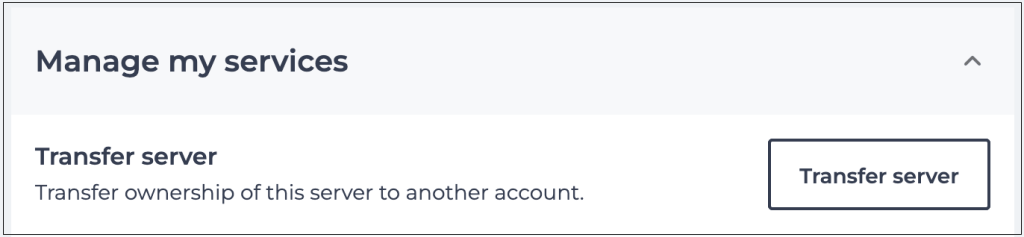
    Scroll down to Manage my services and select Transfer server.
  • 5
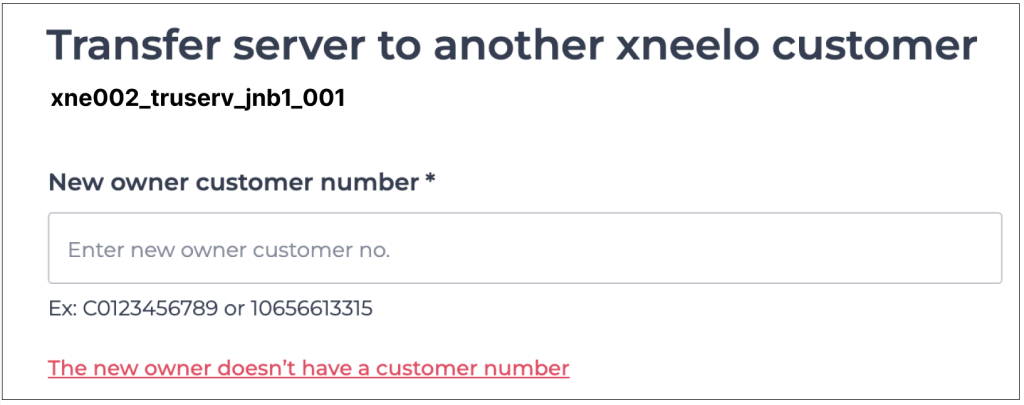
    Enter the new Account Owner’s customer number in the field provided, or select the option in red if they do not have a customer number yet.
  • 6
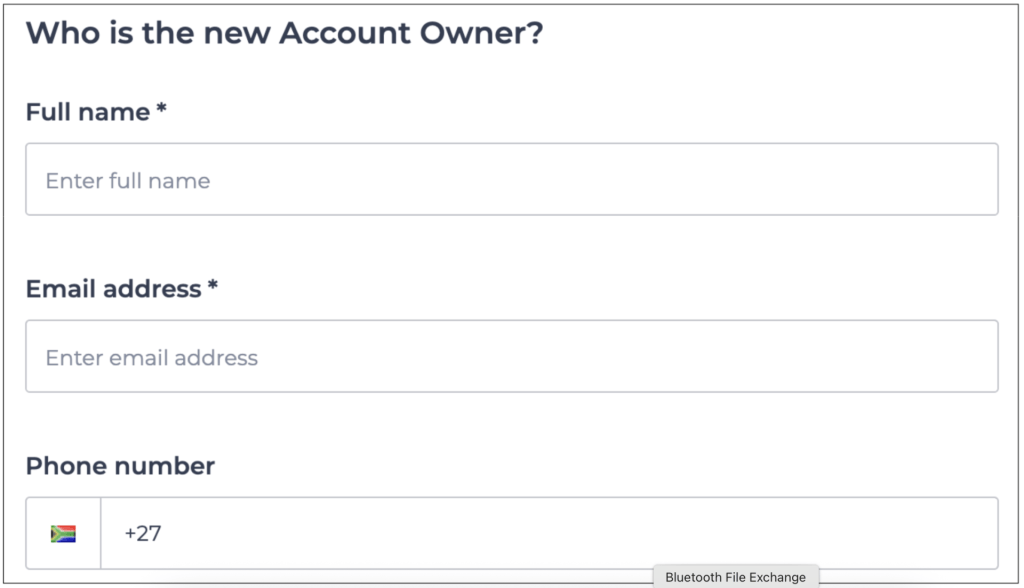
    Enter the new Account Owner’s details if they do not have a customer number yet.
  • 7
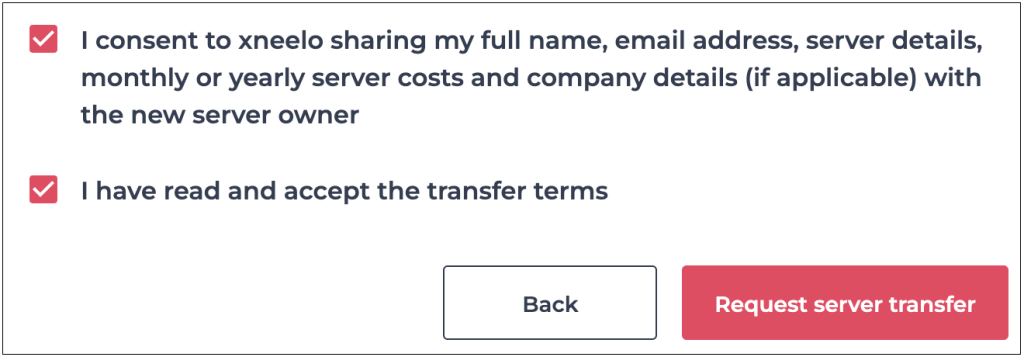
    Agree to the transfer terms by selecting checkboxes and then click Request server transfer.
  • 8
    Our Support department will be in contact for the next steps.
Assist Note

Your server data and network configuration, including IP ranges, will remain unchanged. The only change will be to the server name.

Assist Tip

Transfer terms:

  • Authorised parties on both accounts must consent in writing to complete the transfer
  • Servers transfer ‘as is’ with the current setup and configurations at the time of consent
  • Once transferred, the server name will change to match the new owner’s account
  • Active File Storage accounts and data are permanently deleted during transfers
  • It’s my responsibility to share server access details with the new Account Owner as xneelo doesn’t store them for security reasons
  • Hosting fees paid in advance will be refunded pro-rata

Feedback

Was this article helpful?

Was this Article helpful?
Was this article helpful?

For additional support, please contact us.

Thank you for your feedback

Related Posts:

  • How to order an Internal Transfer on your Managed Server via the xneelo Control Panel
  • How to order an Internal Transfer on your Managed Server
  • How to order an internal transfer via the xneelo Control Panel
  • How to order an internal transfer via konsoleH
  • Internal Account Transfer FAQ
Email
Expert advice & more, straight to your inbox.

Subscribe to receive regular product updates, inspiring stories and practical business advice. Opt out anytime.

"*" indicates required fields

This field is for validation purposes and should be left unchanged.
Social Media

Products

  • Domain Names
  • Domain Transfers
  • Web Hosting
  • Managed Servers
  • Self-Managed Servers
  • Colocation
  • Cloud
  • Reseller Hosting
  • SiteBuilder
  • Cloudbric WAF

Company

  • About Us
  • Data Centre
  • Insights
  • Our Culture
  • Careers
  • Awards

Support

  • Help Centre
  • Network Status
  • Contact Us
  • Report Abuse

Legal

  • Legal Centre
  • Acceptable Use
  • Terms of Service
  • Privacy Policy
  • Security Statement

xneelo (formerly Hetzner SA)
© Copyright xneelo (Pty) Ltd All rights Reserved 1999-2026.
All prices are VAT inclusive.

xneelo

Thanks for watching our video!

Email Article

Email-this-article form

"*" indicates required fields

​​How to order an Internal Transfer of a Self-Managed Server
Self-Managed Servers can be transferred internally between two xneelo accounts.
Ask AI Live Chat
